
ClinicVET: Clearer Canine Health Conversations in 3D
A custom application that gives veterinary professionals interactive 3D anatomy, condition comparisons, and annotations to support client conversations.
On This Page
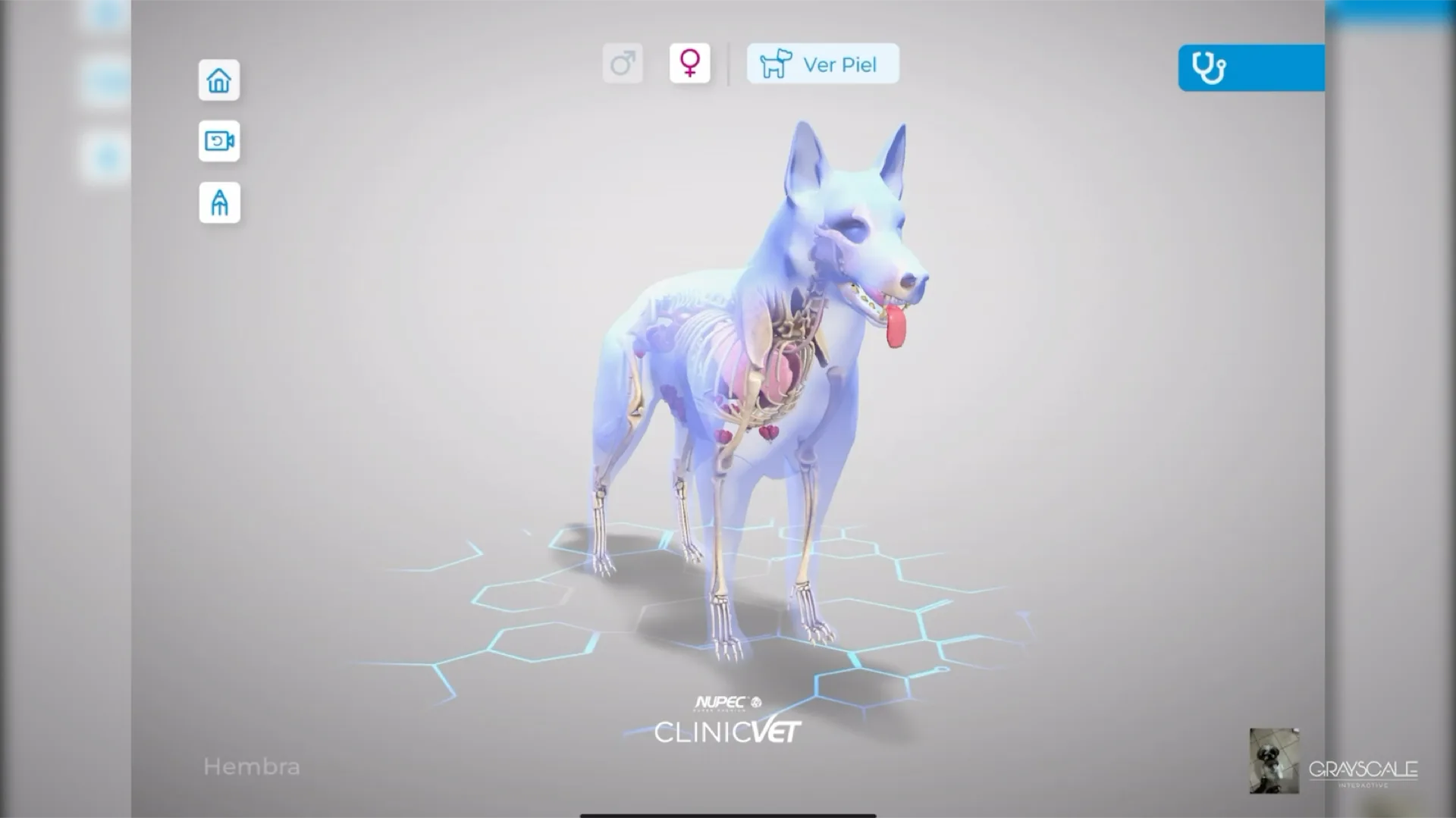
Veterinary conversations often have to bridge a difficult gap: a clinician may understand the anatomy and the condition at a glance, while a pet owner is trying to make sense of an unfamiliar diagnosis in a limited amount of time. ClinicVET was designed as a visual communication aid for that moment, not as a diagnostic system, but as a clearer way to make a clinical explanation visible.
A Shared View of the Patient
The experience starts from a generic canine model that can be adjusted between male and female anatomy. Professionals can move from the exterior into skeletal and organ systems, then isolate the area they need to discuss. Rotation, zoom, and panning keep the conversation anchored to the same view instead of asking someone to interpret a static illustration from across the room.
Comparing What Changes
Within a selected system, the application can surface common clinical conditions and transition the 3D model to illustrate the affected organ. A healthy reference remains available alongside it. That side by side comparison gives the veterinarian a practical visual starting point for explaining what is being discussed, what is different, and where the change is located.
This project preview is temporarily unavailable.
Leave the Explanation With the Owner
ClinicVET also makes room for the details that matter in a specific conversation. The clinician can write or draw directly over the model, then save those annotated images for later consultation. The result is a more deliberate handoff: a visual explanation that can be revisited after the appointment rather than a diagram that disappears when the conversation ends.
- Explore canine anatomy in an interactive 3D view.
- Compare a healthy reference with a selected condition visualization.
- Annotate the view to support a more specific explanation.
Have a complex project to define?
Bring us the workflow, product, or training challenge. We will help you turn it into a clear, buildable first phase.
Continue Exploring

Interactive Archviz: Material Decisions at Full Scale
A VR concept that brings materials, lighting, dimensions, and furniture choices into one real scale spatial walkthrough.
VIEW CASE STUDY

VR Tools: Safety Training Before Workshop Access
A virtual course that combines safety instruction, tool-station practice, and progress records for shared workshop access.
VIEW CASE STUDY